Survey Battle
Team guessing gameFind the five hidden answers and earn more points than the other teams.
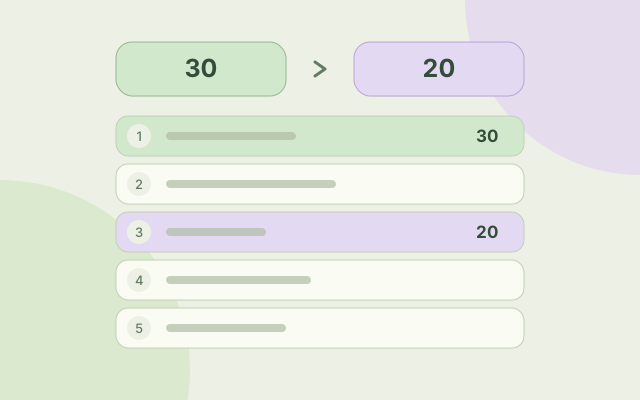
Survey Battle
Free to playHow to play
- Split into two to eight teams and choose a host. The host selects categories, names the teams and starts a match of 4, 8 or 12 questions. Everyone plays together on one screen; no accounts or real-time rooms are needed.
- Before each guess, the host clicks the answering team, types its spoken answer and presses Enter or Send. The field shows the selected team name and colour. Matching answers earn points for that team. Agree whether to answer in order or let the first team to speak answer.
- Reveal all five answers or reach the shared miss limit (six for 2–6 teams, seven for 7, eight for 8) to finish the question. Unclaimed answers earn no points. Undo corrects the latest turn. The highest total after the final question wins. The selected team stays until the host changes it.
- Previously shown questions are excluded from future matches in this browser. Continue a saved match or choose fresh categories. An explicit history reset allows repeats. Answers and fixed points are curated game content, not results of a real public survey.
- The five slots hide answers; this is a spoken guessing game, not multiple choice. Missing or extra spaces and small unambiguous typing mistakes are accepted. Use Reveal board to end a question early without awarding the remaining points. The host does not need the answer list: the game checks submitted guesses. Reveal board displays the answers to everyone and ends the question.
- Gather around one phone or tablet, choose a host and split into two to eight teams. Select categories and a match length, then tap Start match. Fullscreen gives the question board more room.
- Tap the answering team before typing its guess, then tap Send. The field uses that team's colour and shows its name. Selection stays until changed. Try a synonym if needed; Pass records a miss. Undo corrects the latest answer or miss.
- Each board has five prepared answers and ends after all are found or the shared miss limit (six for 2–6 teams, seven for 7, eight for 8). Tap Next question to continue. Match progress and shown-question history are saved in this browser when storage is available.
- The five slots are hidden answers, not choices to tap. Small unambiguous typos and spacing differences are accepted. Tap Reveal board to finish a question early.
Controls
- Team card
- Select which team receives the next matching answer
- Type + Enter
- Host submits the active team's spoken answer
- Pass
- Record a miss without changing the selected team
- Undo
- Reverse the latest answer or miss on this board
- Next question
- Continue after the board is complete
- Tap a team
- Choose which team receives the next matching answer.
- Type + Send
- Host submits the active team's spoken answer.
- Pass
- Record a miss without changing the selected team.
- Undo
- Correct the latest turn without restarting the match.
- Next question
- Continue after the current board is complete.
A little more about the game
Survey Battle is a free browser party game for two to eight teams sharing one device. A host enters spoken guesses while friends or family try to uncover five prepared answers. Its 1,000 original English questions are divided into 20 categories, including food, travel, animals, music, sport and everyday life. Choose 4, 8 or 12 questions per match, with no time limit. The host selects which team answers; matching guesses earn fixed game points for that team. Play in an agreed order or let the first team to speak answer. These are curated answer boards, not measured survey results, so other sensible answers may not be listed. The game supports common synonyms, manual misses, undo, light and dark themes, and local match saves. Questions already shown are remembered in this browser and are not automatically repeated. No download, account or separate player connection is required.
Another round of something different?
 Big gestures. Bigger laughs.
Act It Out
Play Act It Out, a free charades game for 2-8 teams. Portray 500 people, animals and characters with gestures. Guess who is being portrayed in 60-second turns.
 Pass it on. See what happens.
Broken Message
Play Broken Message, a free drawing telephone game for 3-8 players on one device. Pass drawings and guesses along a hidden chain, then reveal every transformation.
 Same letter. Different ideas.
Category Clash
Play Category Clash, a free category word game for 2-8 teams. Write answers starting with one letter in 60 seconds. Unique answers score; duplicates do not.
 Draw a little. Laugh a lot.
Draw & Guess
Play Draw & Guess, a free browser drawing game for 2-8 teams on one shared screen. Draw secret words with a mouse or finger and guess aloud in 60-second turns. No account needed.
 Find another way to say it.
Forbidden Words
Play Forbidden Words, a free party word game for 2-8 teams. Explain 500 words without using four forbidden clues. 60-second turns on one shared device, no accounts.
 Family Christmas game
Merry Pictures
Play a Christmas picture quiz with family and friends. Solve 48 festive emoji puzzles in Family or Challenge sets, with 2–8 teams, hints and host-led scoring.